Stazioni meteo a 433 MHz, sul tuo PC
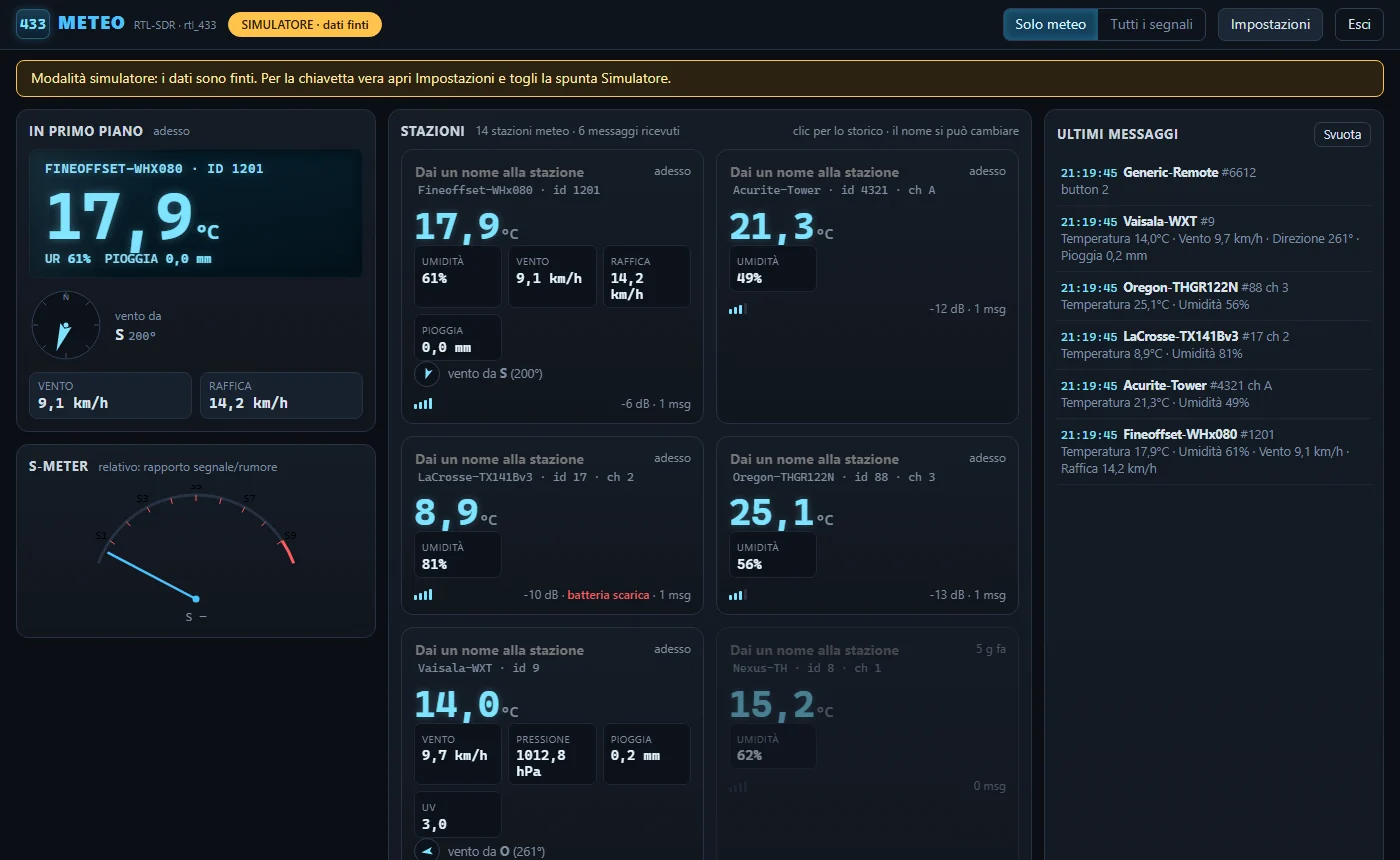
Riceve con una chiavetta RTL-SDR le stazioni meteo che trasmettono a 433 MHz e le mostra in un pannello nel browser:
temperatura, umidità, vento, pioggia, pressione, storico con grafici.
Cosa fa
- Decodifica centinaia di modelli di stazioni e sensori a 433 MHz (rtl_433 25.12)
- Una scheda per stazione, con l'ultima lettura e un nome a scelta
- Grafici di temperatura, umidità e pressione delle ultime ore
- Bussola del vento e S-meter relativo al rumore
- Storico salvato sul PC: le stazioni restano dopo un riavvio
Cosa serve
- Windows 10 o 11 a 64 bit
- Una chiavetta RTL-SDR (o un Airspy, con i driver SoapySDR)
- Driver WinUSB della chiavetta, installato con Zadig (istruzioni nel file LEGGIMI.md installato con il programma)
- Un'antenna per 433 MHz: anche un filo da 17 cm aiuta, una collineare sul tetto meglio ancora
Installazione
- Scarica e avvia Meteo433-Setup-1.0.0.exe. Si installa per il tuo utente, senza amministratore.
- Dal menu Start apri Stazioni meteo 433 MHz: si apre il pannello nel browser su localhost.
- Per provare senza chiavetta, c'è la voce Stazioni meteo 433 MHz (simulatore).
Il programma riceve soltanto, non trasmette nulla. Frequenze e uso dei dispositivi restano sotto la responsabilità di chi li usa.
Gratuito, con donazione facoltativa
Il programma è gratuito. Se ti è utile e vuoi sostenere lo sviluppo, puoi fare una donazione con PayPal, quando vuoi.
Sostieni lo sviluppo (PayPal)
433 MHz weather stations, on your PC
Receives the weather stations that transmit on 433 MHz with an RTL-SDR dongle and shows them in a panel in the browser:
temperature, humidity, wind, rain, pressure, history with graphs.
What it does
- Decodes hundreds of 433 MHz weather station and sensor models (rtl_433 25.12)
- One card per station, with the latest reading and a name of your choice
- Temperature, humidity and pressure graphs for the last hours
- Wind compass and an S-meter relative to the noise floor
- History saved on the PC: stations stay after a restart
What you need
- Windows 10 or 11, 64 bit
- An RTL-SDR dongle (or an Airspy, with the SoapySDR drivers)
- The WinUSB driver for the dongle, installed with Zadig (instructions in the LEGGIMI.md file installed with the program)
- An antenna for 433 MHz: even a 17 cm wire helps, a roof collinear helps much more
Installation
- Download and run Meteo433-Setup-1.0.0.exe. It installs for your user, without administrator rights.
- From the Start menu open Stazioni meteo 433 MHz: the panel opens in the browser on localhost.
- To try it without a dongle, use Stazioni meteo 433 MHz (simulator).
The program only receives, it transmits nothing. Frequencies and the use of devices remain the responsibility of the user.
Free, with an optional donation
The program is free. If it is useful to you and you want to support its development, you can donate with PayPal, whenever you like.
Support the project (PayPal)